How toEvery option explained
Every option explained
Every setting a competition has, what it starts on and what it does. Everything starts on a sensible answer, so most days change very little of this.
Creating the competition
Asked when a competition is made, and changeable afterwards on the Details step.
- JudgesDefault: three
- How many judge seats the panel has, from 1 to 5. Three is the ICF panel; a club night is often one. Each judge seat gets a code, and the console draws a column per seat.
- Run timerDefault: off
- Shows a countdown to the judges and the big screen. The chief judge starts and stops one clock and every screen follows it. With it off nobody sees a clock.
- Rule setDefault: this device's own
- Surface boats or squirt boats, or a rule set of your own. It decides the tricks, their values and the rounds' starting answers. It can be changed until the first score is locked.
- Date from and Date to
- The days the competition runs. A round is set to one of them on the Sessions step.
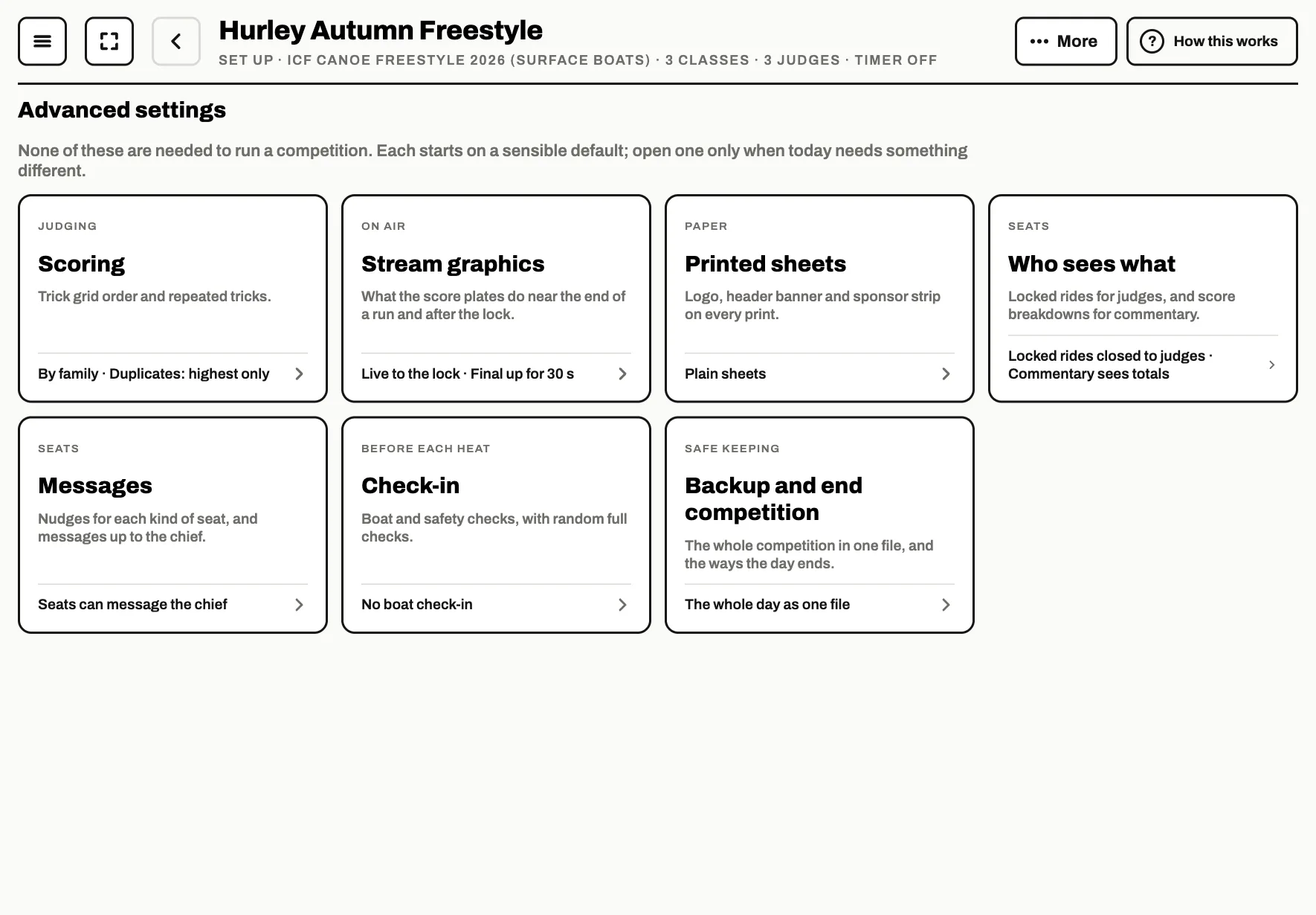
Advanced settings
On the Details step, under Advanced settings · optional. None of them are needed to run the day; each row says what it is set to and is marked Changed when it is not the app's own answer.
Scoring
- The trick gridDefault: By family
- How the tiles are laid out on the judges' grid: grouped the way the rule book groups the moves, or A to Z.
- A trick called twiceDefault: Log duplicate tricks, score highest only
- Do not log duplicate tricks is the ICF rule: the grid refuses a second call of a trick the same way. Log duplicate tricks, score highest only lets the judge log it again and counts the best one, with every extra it earned. Log duplicate tricks, score all counts every one.
Squirt
Only for a squirt rule set.
- The mystery move's secondsDefault: Judges time it on the grid
- Whether judges time the mystery with a stopwatch on the grid, or add the seconds in review after the run.
- Base score until the lock
- The graphics show the score without the multiplier during the run, then apply it when you lock.
Stream graphics
For a big screen or a live stream.
- The score on the platesDefault: Live, then green at the lock
- Live: the score moves as the judges score and turns green when you lock it. Freeze near the end: it stops moving near the end, so the result lands when you lock it.
- Freeze with this long leftDefault: 10 seconds
- How long before the end the score stops moving, when it freezes.
- Keep the final score up forDefault: 30 seconds
- How long the locked score stays on screen.
- Links for OBS or vMix
- The pages to add to your streaming software, with their size, a dark or light plate, and the class to show.
Printed sheets
- Logo, Header banner and Sponsor strip
- Your own pictures on every printed sheet. They can also go to the website with the results.
Who sees what
- Judges can open locked ridesDefault: off
- Once a ride is locked a judge sees its total and cannot open their sheet again until the competition ends. Turn this on to let them.
- Commentary sees score breakdownsDefault: off
- Commentary sees the panel score, the run scores and the bio, but not the tricks each judge gave, unless this is on.
Messages
- Your nudges
- The quick messages you can send each kind of seat from the console.
- Seats can message the chiefDefault: on
- Judges, scribes, commentary, the observer and the check-in desk can send you a short message. They cannot message each other.
Check-in
Boat checks before each heat.
- Boat check-inDefault: off
- Adds a Check-in seat to the seat codes. You see a tick by each paddler who has cleared it.
- Checked for every paddler
- Here for their heat, always, and optionally the boat material and the safety gear.
- Random full checksDefault: off
- Picks paddlers at random, from 10% to all of them, for a full check of the gear on the list.
Backup and end competition
- Export all competition data
- The whole competition in one file, to keep or to put back on another device with Import a backup.
- End the competition
- Closes the day: End the competition, or End and publish results to send the final results to the site as it ends. It can be reopened.
Classes
From the menu on a class's row on the Classes step.
- Fun moves on the grid
- Puts the fun moves on the judges' grid for this class.
- Paddlers' names on the siteDefault: Full name
- Full name, First name or Bib only. A junior class (a code ending in J, or Junior in its name) starts on First name, so a junior's surname and club never go up unless you change it.
Rounds
Tap a round on the Sessions step. Each starts on the rule book's answers.
- Day
- Which day of the competition the round is paddled.
- Separate class heatsDefault: on for semis and finals
- When a round is made up from more than one class, whether each class gets its own heats or they are drawn together. The results always come out a class at a time.
- Who paddles it
- Everybody entered, for a first round, or the paddlers coming through from the round before, and how many.
- Paddlers a heatDefault: five
- How many paddlers the draw puts in each heat.
- Jam styleDefault: off
- A jam: the paddlers take turns on the feature for a set time, and the chief judge calls each one on.
- FeatureDefault: the competition's
- Hole, wave, or hole and wave. It decides which tricks are on the grid.
- Feature is attainableDefault: on
- Whether the feature counts as attainable under the ICF rules. It changes the rule book's runs for prelims: two runs that both count when it is, three runs with the best two counting when it is not.
- Runs eachDefault: from the rule book
- How many runs each paddler gets, 1 to 5.
- Runs that countDefault: from the rule book
- All runs, Best 2 or Best 1.
- Run lengthDefault: 45 seconds
- The length of each run, when the run timer is on. A jam has its own length, and a paddler run length for each turn.
Publish
On the Publish step.
- Names on the siteDefault: As each paddler is set
- How names appear online: as each paddler and class is set, or Full name, First name or Bib only for everybody.
- Results on the siteDefault: Total scores
- Total scores, Tricks and scores, or Detailed scores with every judge's marks.
- Send the print imagesDefault: off
- Sends your logo, banner and sponsor strip to the competition's page.
- Keep the site up to dateDefault: off
- Every time the chief judge locks a run, the results go up again. A paddler watching at home sees a score within a few seconds of the water.
- Publish key
- Made with the competition: it is what lets you update or remove the results later. At least 16 characters of letters, digits, hyphens and underscores. Keep it safe.
- Organiser emailDefault: empty
- Optional, and shown on the competition's page so paddlers know who to ask about the results.