How toOn the day
On the day
How a run goes from the chief judge's console, from calling a paddler up to locking the score.
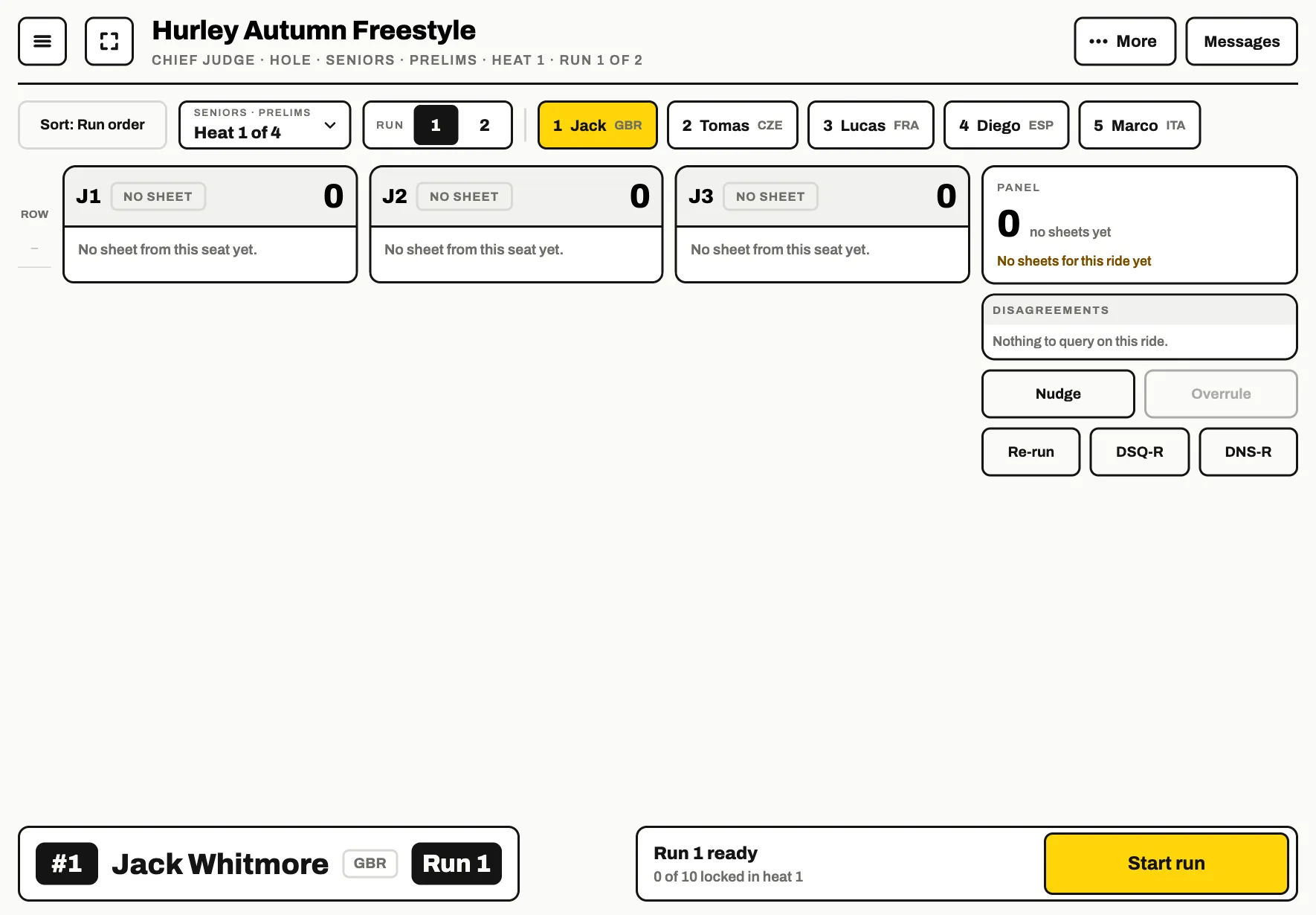
Start the run
The console shows who is up in the box at the bottom left. When they are on the feature, tap Start run . Every judge's grid opens on that paddler.
End the run and review
When the run is over, tap End Run and Review. The judges check their sheets and submit them. The console shows who it is still waiting on.
Pressed it too early? Reopen run puts the paddler back on the water.
Lock the score
When every judge has submitted, tap Lock score. The run's score is written and the console moves on to the next paddler.
Cannot wait for a judge? Lock anyway locks without them and asks for a reason for the record.
When something needs putting right
Nudge sends a judge a quick message. Overrule zeroes or changes a trick on a judge's sheet, with the change shown on the sheet. Re-run, DSQ-R and DNS-R record a re-run, a disqualified run and a paddler who did not start. A locked run can be taken back with Unlock score.
Results and publishing
Under More are Result lists, ranked as they stand, and Print and export for the sheets, the schedule and the files.
To put the results online, use Publish on the Publish step, or turn on Keep the site up to date there so every lock goes up as it happens. At the end of the day, End and publish results does both at once.